Anroid 5.X 新特性之 Palette

在 Android 5.X 中能够使用 Palette 来提取颜色,已达到能够动态适应当前页面的色调,做到整个 App 界面的颜色基调和谐统一。

Android 内置了几种提取色调的种类,如下:

  • Vibrant(充满活力的)
  • Vibrant dark(活力黑)
  • Vibrant light(活力亮)
  • Muted(柔和的)
  • Muted dark(柔和的黑)
  • Muted light(柔和的亮)

通过 Palette,能够让我们从 Bitmap 中获取对应的色调,来修改当前主题的色调。

那么,我们如何能够做到呢?

Step 1: 添加依赖

已 AS 为例,在项目上点击 F4,然后在 Module Setting 的 Dependencies 选项卡中添加 com.android.support:palette 最新的依赖,再 Sync 项目。

Step 2: 调用相关 API

传递一个 Bitmap 对象给 Palette.Builder, 再调用其 generate() 静态方法来创建一个 Pallete.
接下来就可以使用 getter 方法来检索相应的色调,色调列表在上文中已经列出。

Step 3: 示例代码

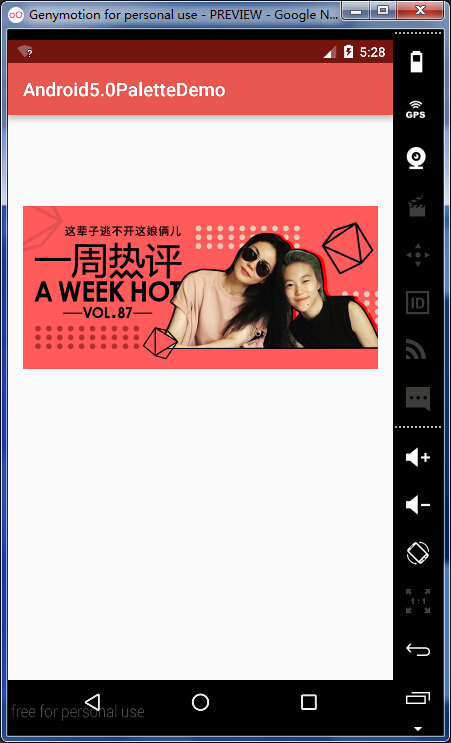
下面的代码演示如何通过加载的图片的柔和色调来改变状态栏和 Actionbar 的色调,代码如下:

1
2
3
4
5
6
7
8
9
10
11
12
13
14
15
16
17
18
19
20
21
22
23
24
25
26
27
28
29
30
31
32
33
34
35
36
37
38
39
Bitmap bitmap = BitmapFactory.decodeResource(getResources(),
R.drawable.test3);
// Create a Palette Object.
Palette palette = new Palette.Builder(bitmap).generate();
// Get the corresponding tones by the Palette.
// 活力黑
Palette.Swatch vibrantDark =
palette.getDarkVibrantSwatch();

// 充满活力的
Palette.Swatch vibrant =
palette.getVibrantSwatch();

// 活力亮
Palette.Swatch vibrantLight =
palette.getLightVibrantSwatch();

// 柔和
Palette.Swatch muted =
palette.getMutedSwatch();

// 柔和黑
Palette.Swatch mutedDark =
palette.getDarkMutedSwatch();

// 柔和亮
Palette.Swatch mutedLight =
palette.getLightMutedSwatch();

// Set the color to the corresponding component.
getSupportActionBar().setBackgroundDrawable(
new ColorDrawable(vibrant.getRgb())
);

// If the current system version is >= 'LOLLIPOP'.
if (Util.getSystemVersion() >= Build.VERSION_CODES.LOLLIPOP) {
Window window = getWindow();
window.setStatusBarColor(vibrantDark.getRgb());
}

效果图如下:


注意:Pallete 的 API 在获取 柔和柔和黑 的时候可能会报空指针异常。

附:Demo 的下载地址

文章有帮助到您?不妨打赏博主一碗拉面或一杯咖啡的小费吧 :-D!